Edit common video files like AVI, WMV, MPG, MOV, MP4, FLV, 3GP, MKV, AVCHD, MTS, MOD, TOD, MXF, XAVC, Tivo, PVR files on Windows and Mac
Sony today released its first 4K consumer camcorder - the new FDR-AX1 4K Handycam that records 4K and HD movies in the XAVC S format, which uses MPEG-4 AVC/H.264 Long GOP for video and Linear PCM for audio compression, while saving files in an MP4 wrapper.
As XAVC S is the brand new video format, currently, there are few video editing programs that promised to extend its support for it. It is therefore, really difficult to edit XAVC S videos on Mac.
Luckily, you can always find a solution, why not use a third-party software such as Pavtube HD Converter for Mac which can fast and best convert Sony FDR-AX1 XAVC and Sony F55/F5 4K XAVC videos as well to Mac friendly AIC MOV or Prores MOV files for free editing in iMovie or Final Cut Pro
Click "Add Video" to load individual videos, otherwise you can "Add from folder" to load all the videos recorded by Sony FDR-AX1 Handycam.
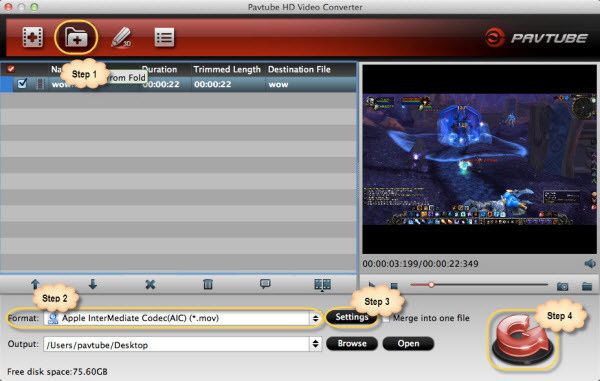
Step 2. Choose the output format
Click "Format" bar, you can get optimized videos for "iMovie and Final Cut Express"> "Apple Intermediate Codec (AIC) (*.mov)"

Or click the “Profile” option, and move mouse cursor to "Final Cut Pro" > "Apple ProRes 422 HQ (*.mov)" as output format.

To get 1080 videos, we need to click the “Settings” button and choose 1920*1080 as output video resolution.
Click "Convert" button to start the conversion from Sony XAVC recording to AIC MOV for iMovie or ProRes MOV for Final Cut Pro. And then, you can free transfer Sony FDR-AX1 XAVC S videos to iMovie or Final Cut Pro for editing.
Tips: If you want to editing Sony FDR-AX1 XAVC S videos on Windows, you can turn to Pavtube HD Video Converter.


/image%2F0232046%2F20160514%2Fob_41644e_ob-b5ed13-wonderfox-dvd-video-converte.png)
/image%2F0232046%2F20160108%2Fob_85faad_drfoneforios-sc05.jpg)
/image%2F0232046%2F20160106%2Fob_65a006_drfone-android-sc01.jpg)
/image%2F0232046%2F20140927%2Fob_cd00b6_ob-1514ce-ipod-home-mac.jpg)