Edit common video files like AVI, WMV, MPG, MOV, MP4, FLV, 3GP, MKV, AVCHD, MTS, MOD, TOD, MXF, XAVC, Tivo, PVR files on Windows and Mac
WebEx is world famours video conferencing software that is used to provide on-demand collaboration, online meeting, web conferencing for users. WebEx record record your meeting's audio and video components into WebEx's ARF file. Since ARF files are WebEx meeting files users have recorded and downloaded from the Internet. Since these are proprietary file formats, only Cisco's WebEX Player can initially convert them to Windows Media Video (WMV) for editing in Windows Movie Maker.
To convert ARF files to Windows Movie Maker WMV files, you need WebEx Network Recording Player. And below are detailed steps to convert ARF to WMV for Windows Movie Maker:
Step 1: Open Network Recording Player that you have already installed on your computer.
Step 2: Click on the "File" and select "Open".
Step 3: Find and open the .ARF file you want to convert to the WMV format.
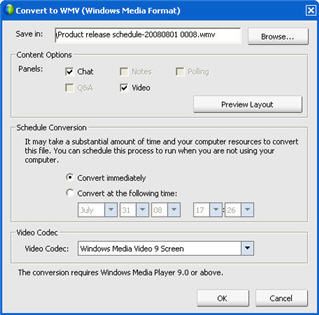
Step 4: Click on the "File" and select "Convert". Select "WMV (Windows Media Format)."
Step 5: Select the location where you want to save the WMV file.
Step 6: Select the appropriate options for the conversion process. Typically you will determine when and which codec you want to use during the conversion process.
Step 7: Click "OK" on the "Convert to WMV (Windows Media Format)" dialog and the confirmation dialog box.
After conversion, you can free converted ARF files to Windows Movie Maker for editing. If you need to play WMV files on portable devices such as iPhone, iPad, Samsung Galaxy S2/S3, Samsung Galaxy Note, Kindle Fire and other smartphones or Android tablets, you can convert WMV to MP4 using a Video Converter.


/image%2F0232046%2F20160514%2Fob_41644e_ob-b5ed13-wonderfox-dvd-video-converte.png)
/image%2F0232046%2F20160108%2Fob_85faad_drfoneforios-sc05.jpg)
/image%2F0232046%2F20160106%2Fob_65a006_drfone-android-sc01.jpg)
/image%2F0232046%2F20140927%2Fob_cd00b6_ob-1514ce-ipod-home-mac.jpg)