Edit common video files like AVI, WMV, MPG, MOV, MP4, FLV, 3GP, MKV, AVCHD, MTS, MOD, TOD, MXF, XAVC, Tivo, PVR files on Windows and Mac
"I and my friend recorded some clips on his video camera and then later we wanted to edit them in iMovie on my mac. Only problem is, he saved them on his computer & then wiped them from his camera & then gave me the files via sd card to import into imovie but they wont open because they are mod. files - aren't compatible with iMovie. This is sooooo frustrating and I would love a simple solution please!!!"
MOD is informal name of tapeless video formats used by JVC, Panasonic and Canon in some models of digital camcorders. It is a kind of video format that can't be imported into iMovie directly. In order to import MOD to iMovie, you need to first convert MOD to iMovie compatible MOV or MP4 files.
Don't worry, the problem can easily be solved with MOD to iMovie Converter. With it, you can easily convert MOD files shot from JVC, Panasonic or Canon camcorders to iMovie workable MOV or MP4 files for easy import MOD files to iMovie for free editing.
Below are the detailed guides for you to easy convert MOD to MOV or MP4 files for easy MOD ediitng in iMovie
Step 1: Import MOD files
Drag & drop MOD files to MOD to iMovie Converter. Or go to "File" menu, choose "Load Media Files" to import the MOD files you want to add.
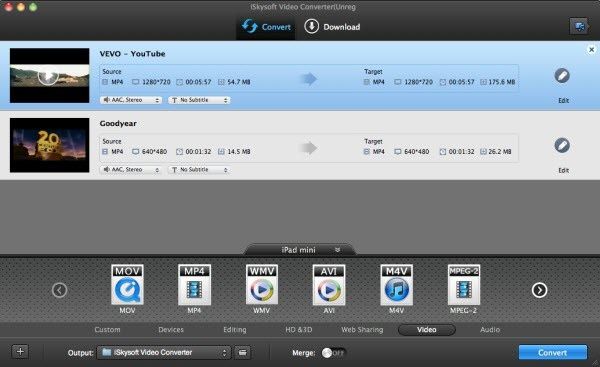
Step 2: Set iMovie as output format
MOD to iMovie Converter will automatically set the format, resolution and frame rate for you, maintaining the video quality, and the output video can be imported to iMovie 11/iMovie 09/iMovie 08/iMovie HD on Mac (Mountain Lion included).
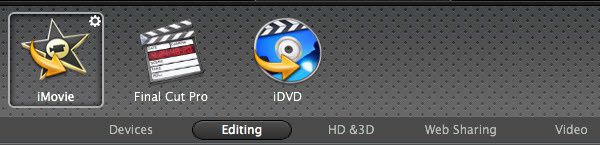
Step 3: Convert MOD to iMovie MOV, MP4
Click "Convert" to start converting MOD files to iMovie compatible MOV or MP4 format. After converting, you can easily transfer MOD to iMovie for free editing.


/image%2F0232046%2F20160514%2Fob_41644e_ob-b5ed13-wonderfox-dvd-video-converte.png)
/image%2F0232046%2F20160108%2Fob_85faad_drfoneforios-sc05.jpg)
/image%2F0232046%2F20160106%2Fob_65a006_drfone-android-sc01.jpg)
/image%2F0232046%2F20140927%2Fob_cd00b6_ob-1514ce-ipod-home-mac.jpg)