Edit common video files like AVI, WMV, MPG, MOV, MP4, FLV, 3GP, MKV, AVCHD, MTS, MOD, TOD, MXF, XAVC, Tivo, PVR files on Windows and Mac
YouTube is a popular video sharing website for you to upload, view and share videos. You can also download your favourite videos from YouTube. Then, you need to edit these videos to make your stylish, personalized and creative videos.
As a Mac users, the most commonly used video editing application is Mac. However, when you try to import YouTube videos to iMovie, you will find it impossible. Why? Becuase the videos that downloaded from YouTube are mainly in Flash FLV format which is not a compatible format for iMovie who natively accept MOV or MP4 files.
Then, you may need a Mac Video Converter to convert FLV files to iMovie readable MOV or MP4 files. FLV to iMovie Converter is definitely a good choice for you to easy and fast convert FLV video to MOV or MP4 fiels so as to free transfer Flash FLV files to iMovie for editing.
Step by step to convert Flash FLV files to iMovie
Step 1: Load FLV files
Drag & drop YouTube FLV videos to the program. Or go to "File" menu, choose "Add Video Files" to locate the YouTube videos you want to add.
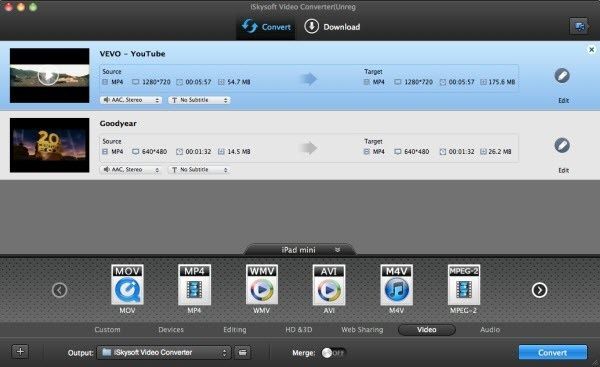
Step 2: Select iMovie as output format
Select "iMovie" from output format dropdown list. If you only need to import a specific YouTube clip to iMovie, you can use the "Split" function to get the clips you need.
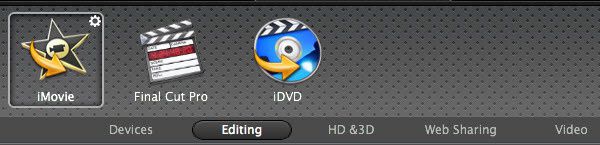
Step 3: Convert FLV files to iMovie
Hit "Convert" button to start YouTube FLV video to iMovie conversion.


/image%2F0232046%2F20160514%2Fob_41644e_ob-b5ed13-wonderfox-dvd-video-converte.png)
/image%2F0232046%2F20160108%2Fob_85faad_drfoneforios-sc05.jpg)
/image%2F0232046%2F20160106%2Fob_65a006_drfone-android-sc01.jpg)
/image%2F0232046%2F20140927%2Fob_cd00b6_ob-1514ce-ipod-home-mac.jpg)