Edit common video files like AVI, WMV, MPG, MOV, MP4, FLV, 3GP, MKV, AVCHD, MTS, MOD, TOD, MXF, XAVC, Tivo, PVR files on Windows and Mac
We all know that iMovie is a free and good video editing program for Mac users, it is convenient for you to import MP4 videos to iMovie for free editing. However, as iMovie only natively work with several video formats such as MOV, MP4 etc. It is may not be possible for you to import other videos to iMovie for editing.
iMovie even can't with some MP4 files becasue MP4 is a container file format which may contain different types of codes. Actually iMovie works smoothly with MP4 files with codec of MPEG-4 and H.264. Therefore, if you got MP4 files with other codes, it will become a problem for you to directly transfer MP4 files to iMovie.
Then, you need to find a third-party application to help you solve the problem. The best way to find a Mac Video Converter. As far as I know, there is one program named MP4 to iMovie Converter which is specially designed for Mac users to convert MP4 to iMovie (08', 09' and 11' included) compatible file formats.
Tips: Besides helping editing MP4 files in iMovie, MP4 to iMovie Converter is also able to convert other video files such as AVI, MPG, WMV, MKV, AVCHD, MTS, MOD etc to iMovie readable files.
Easy steps to convert MP4 videos to iMovie on Mac (Mountain Lion included)
Step 1: Add MP4 files
Here you can directly drag & drop MP4 files to MP4 to iMovie Converter, or go to "File" menu then choose "Load Media Files" to load the MP4 phone files.
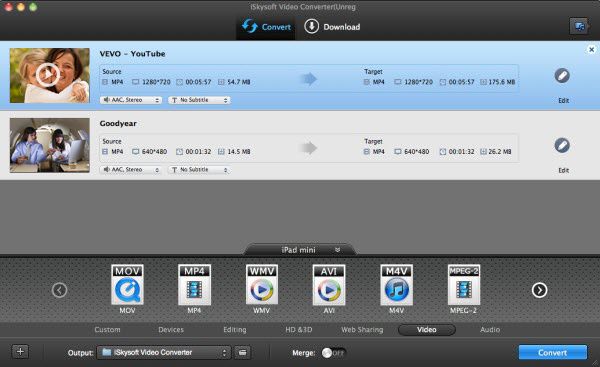
Step 2: Choose iMovie as output format
You can directly choose the preset for iMovie which has been supplied by the MP4 to iMovie Mac Converter. The setting also works for iMovie '08, iMovie '09, iMovie '11, and iMovie HD etc
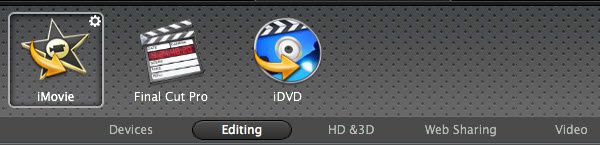
Step 3: Convert MP4 files to iMovie
After all the settings have been done, Click "Convert" to begin MP4 to iMovie conversion. After that, you can easily import MP4 files to iMovie


/image%2F0232046%2F20160514%2Fob_41644e_ob-b5ed13-wonderfox-dvd-video-converte.png)
/image%2F0232046%2F20160108%2Fob_85faad_drfoneforios-sc05.jpg)
/image%2F0232046%2F20160106%2Fob_65a006_drfone-android-sc01.jpg)
/image%2F0232046%2F20140927%2Fob_cd00b6_ob-1514ce-ipod-home-mac.jpg)