Edit common video files like AVI, WMV, MPG, MOV, MP4, FLV, 3GP, MKV, AVCHD, MTS, MOD, TOD, MXF, XAVC, Tivo, PVR files on Windows and Mac
"Is it possible to combine like 2 or 3 different videos into one whole video on my iPhone, or other devices? If not, is there an app I can get to combine them? Thanks!"
To combine videos of different formats into one file, you need to get a professional Video Merger. Here, you can turn to iSkysoft Video Editor which is a powerful Video Joiner to merge/join multiple videos of the same or different formats like AVI, MP4, MOV, WMV, MKV, MPG, ASF, M4V, DV, VOB, AVCHD, MTS, MOD, TOD, Tivo, XAVC, VRO, MXF etc. files into a single one with splendid editing features.
Not only iSkysoft Video Editor can help you combine videos, it can also allows you to crop, trim, split, rotate videos. Besides, it can Touch up your videos with filters, special effects, transitions and more.
Tips: If you want to combine/join videos on Mac, you can turn to Video Joiner for Mac.
Step by step to combine videos on Windows
Click "Import" to import videos. The added files will be listed in the video library on the right of the interface.
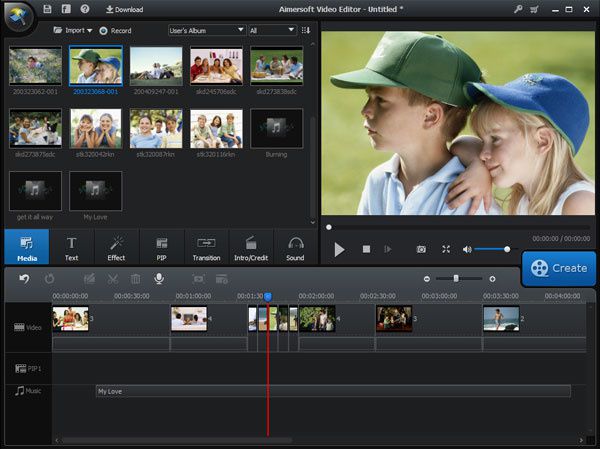
Once you have added all your target files into the video library. Drag all of them into the timeline panel and they will be joined into a single one automatically.
Tips:
1. You'd better drag videos one by one so that these videos are arranged according to the play order.
2. Don't drag one file to another file, or you'll split the latter. If necessary, you can move the slider bar to add videos to the Timeline better.
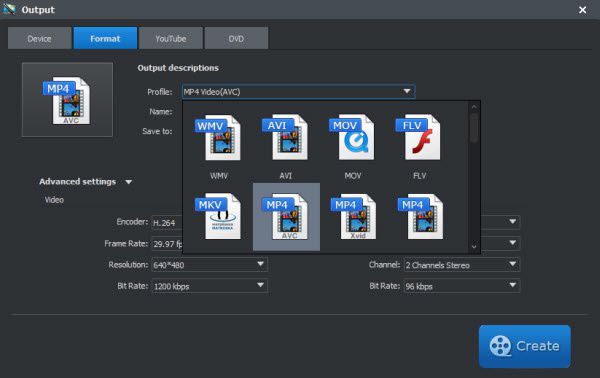
When all modifications satisfied, just hit "Create" tab to export your videos now. You can export your original video formats without converting or directly convert to your portable devices like iPhone, iPad, HTC, Samsung Galaxy, etc. They'll play perfect on your devices.
Alternatively, you can share your creation to YouTube directly from this software, or burn to DVD for better preservation. Just go for it, and then click “Create” to finish the exporting.
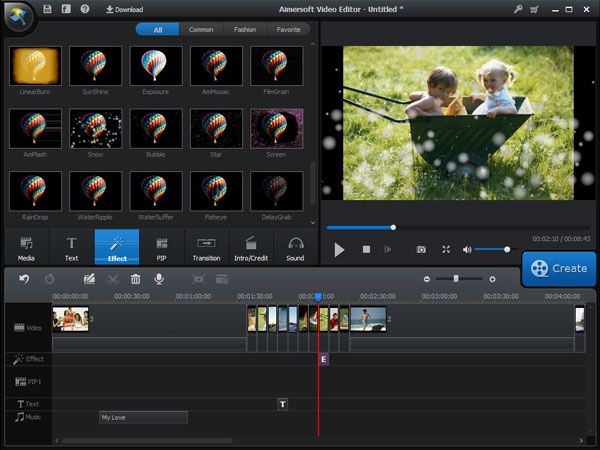
Optional: Edit and adjust the merged video files
If you would like to do some editing to the video clips, you can just scramble and rearrange the merged video clips in the sequence with the timeline, or add some stunning transition or adjust other special effects with the editing box.


/image%2F0232046%2F20160514%2Fob_41644e_ob-b5ed13-wonderfox-dvd-video-converte.png)
/image%2F0232046%2F20160108%2Fob_85faad_drfoneforios-sc05.jpg)
/image%2F0232046%2F20160106%2Fob_65a006_drfone-android-sc01.jpg)
/image%2F0232046%2F20140927%2Fob_cd00b6_ob-1514ce-ipod-home-mac.jpg)